


TL;DR
Why does my Google Business Profile say 'posting reviews is turned off for this place'?
Google temporarily blocks new reviews on profiles it suspects of manipulated review activity — typically for 30 days. The trigger is usually a sustained burst of reviews from on-site requests or QR codes over 60 to 90 days. Appeals rarely lift the block early, but filing one still matters. The fix is changing how you ask for reviews going forward.
You check your Google Business Profile and see it: “Posting reviews is turned off for this place.” No warning. No email. The phone hasn’t changed, the work hasn’t changed — but the reviews have stopped cold.
This is happening to legitimate home-service businesses right now, and the pattern behind it is specific enough that you can both understand it and avoid it.
What a Review Block Actually Is
A review block is Google temporarily locking a profile so that no new reviews can be submitted — typically for 30 days. The message customers see when they try to leave one is “Posting reviews is turned off for this place,” usually accompanied by a note about “suspicious high-rated reviews.”
The block doesn’t mean Google thinks you’re a fraud. It means your review activity matched a pattern their algorithm associates with abuse. That’s a meaningful difference — but it doesn’t make the 30 days hurt any less.

The Pattern That Triggers the Lock
According to research tracked by Claudia Tomina at Sterling Sky, Google isn’t reacting to a single big day of reviews. It’s reacting to sustained, elevated velocity over time.
The clearest case in the data: a business running at a baseline of 72 reviews per month saw its volume climb to 179 in September, 235 in October, and 181 in November — a 2.75× spike held for roughly three months before Google acted. The block didn’t come during the first surge. It came after the pattern became undeniable.
Three signals appear repeatedly in the cases Tomina tracked:
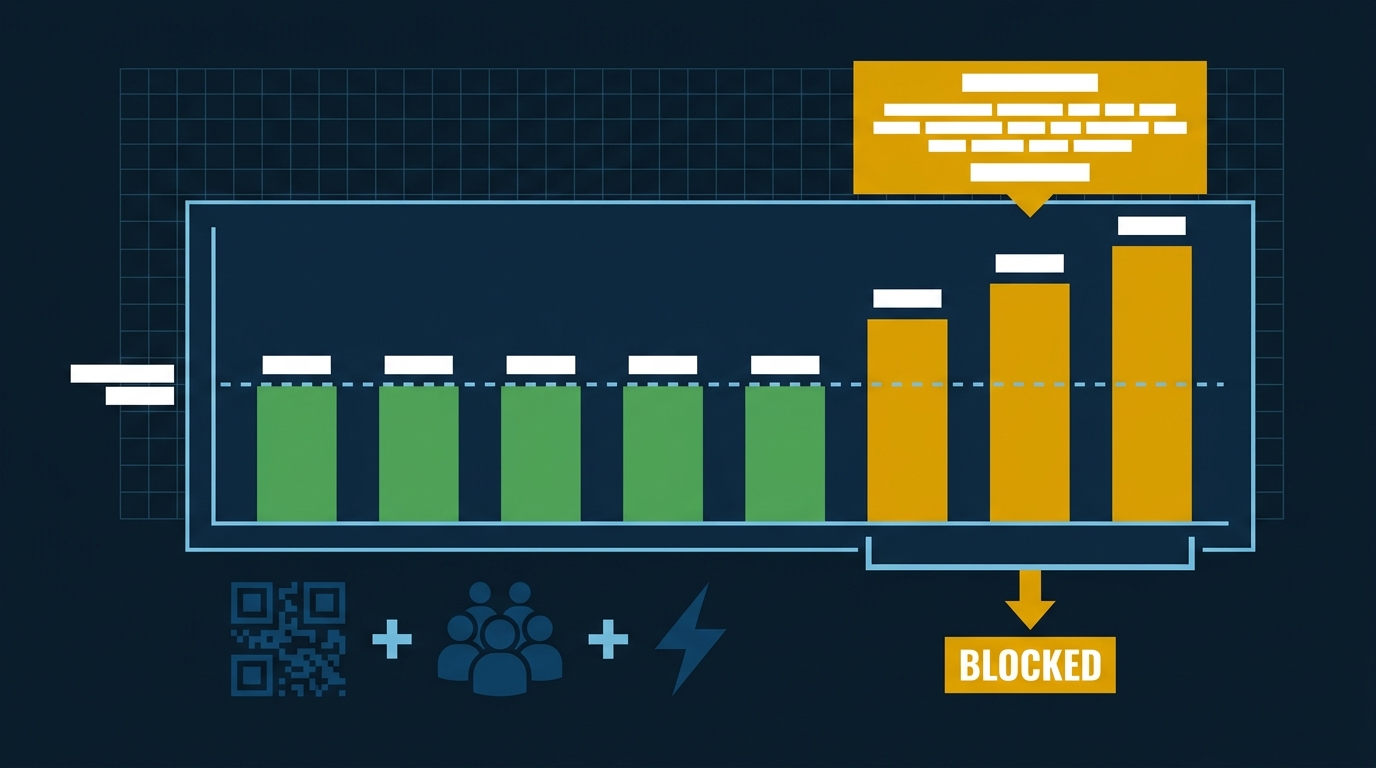
- Reviews left inside the business — customers reviewing while still on-site
- QR codes at the counter or checkout — making it easy to leave a review before they’ve even driven home
- Bursts of 10 or more reviews in a single day
None of these is automatically a problem. But when all three show up together, repeatedly, over 60 to 90 days, Google’s algorithm flags it.
What Happens to the Reviews You Already Have
Here’s the part that stings: it’s not just the new reviews that stop. In the same case above, Sterling Sky’s data shows that 595 reviews were generated during the surge period, and 342 of them — 57.5% — were deleted. The removals were selective, not a full wipe. Google appears to have targeted reviews it classified as suspicious, with on-site reviews more likely to be in that group.
Your five-star rating from a customer who left a review while standing at your service counter is more vulnerable than the one left three days later from their couch.
Why Appealing Usually Won’t Help — But You Should Do It Anyway
You can submit an appeal through Google’s support form. You should. But manage your expectations.
In every case Tomina tracked over the 60-day observation window, the block lasted the full 30 days regardless of the appeal outcome. The appeal didn’t shorten a single one.
File it anyway. Google uses that data to calibrate whether their algorithm is incorrectly flagging legitimate businesses. Your case contributes to that signal. Skip it and you’re leaving the algorithm unchallenged.
Why This Matters More Than You Think
Reviews aren’t just reputation — they’re the mechanism by which Google’s AI decides who to surface when someone asks for help.
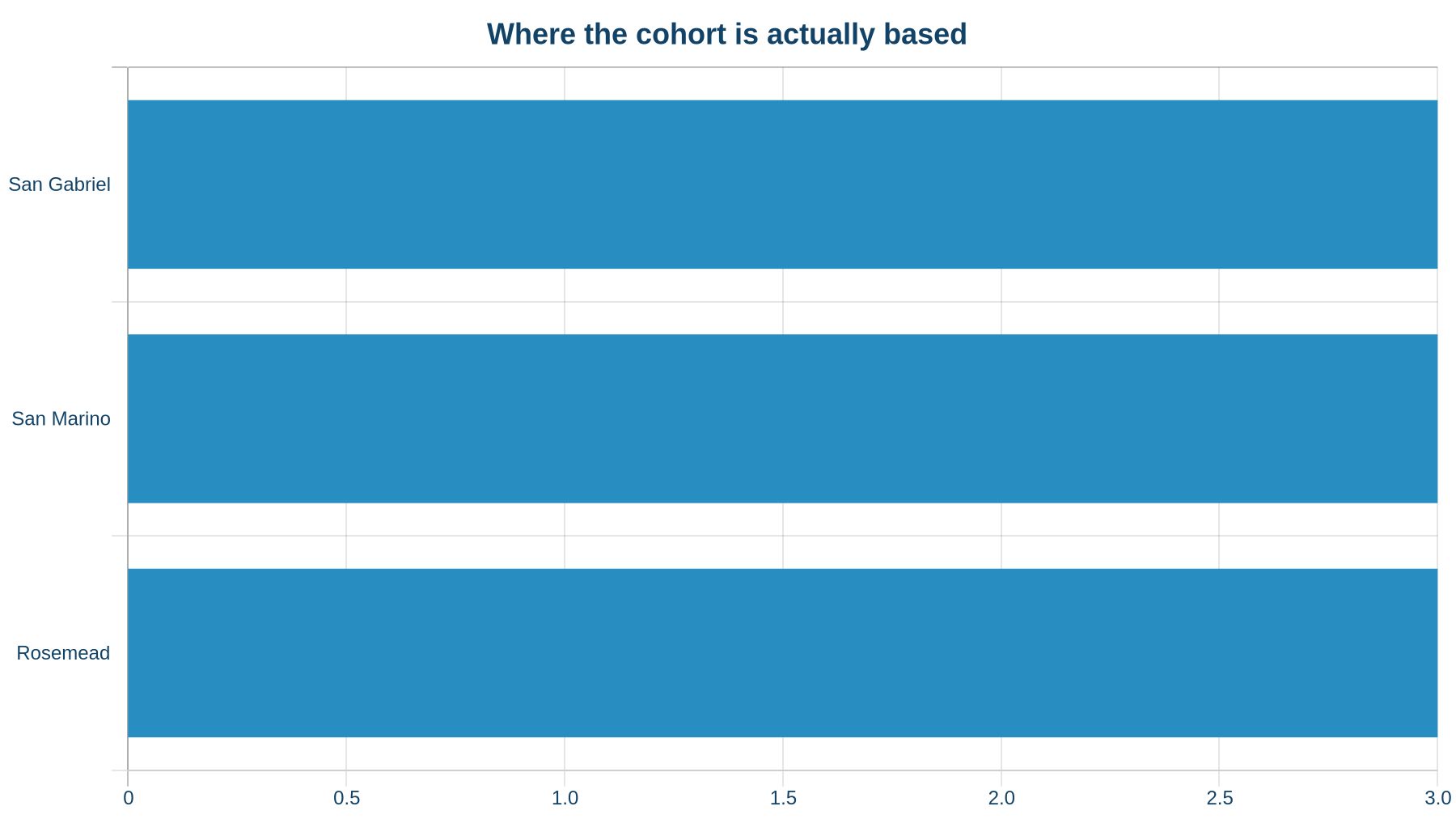
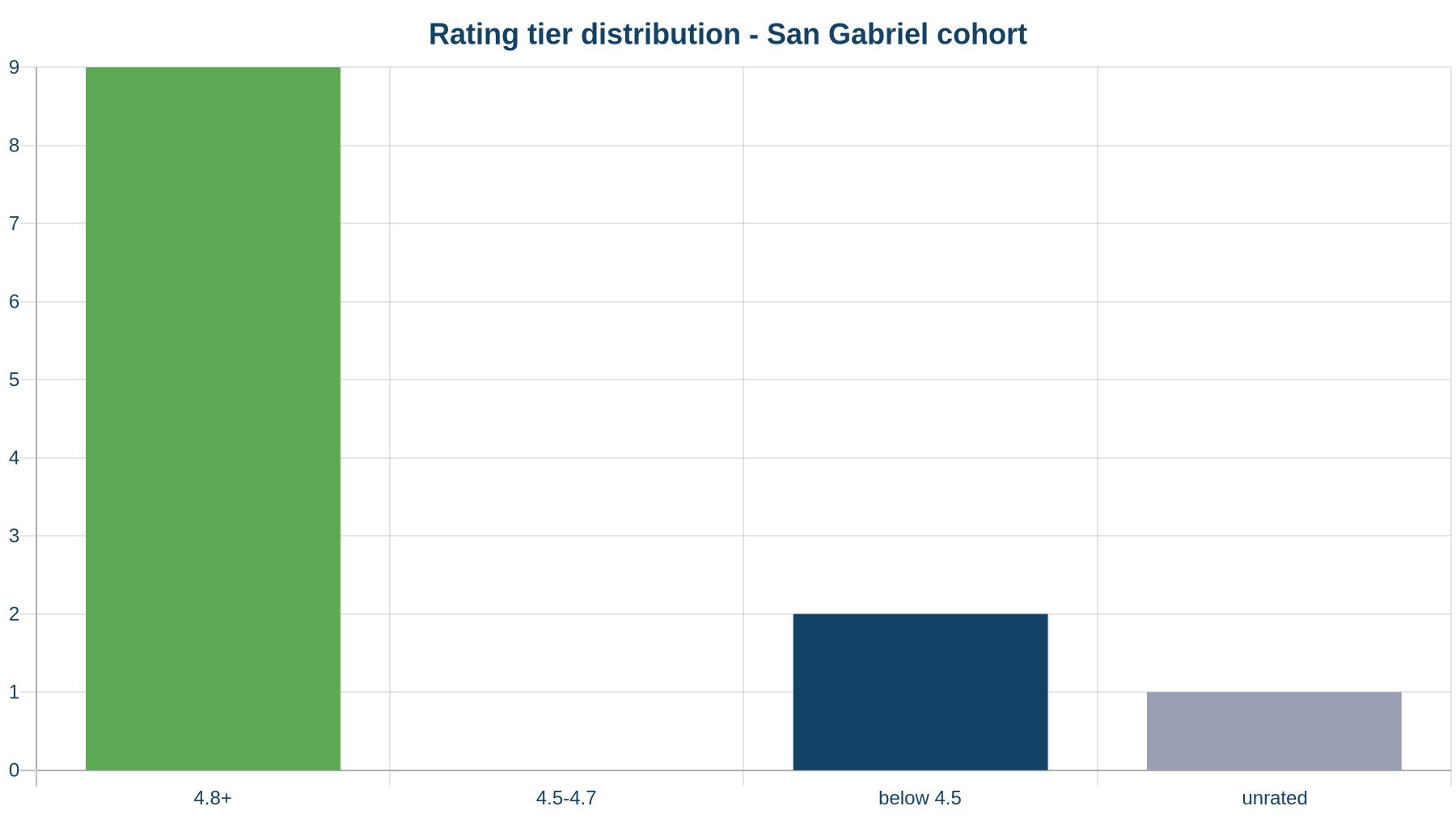
We asked Google’s Maps-grounded AI for the best-rated plumber in San Gabriel and pulled the top profiles from that search to understand the gap. Of the 12 plumbing profiles competing for that search, only 3 are physically based in San Gabriel; the other 9 sit in San Marino, Rosemead and neighboring cities. The AI surfaced exactly one of the 12: Profile A, with 117 reviews and the newest posted just 40 days ago. The 11 it skipped had a median of 8 reviews, with the newest review a median of 160 days old. One caveat on the charts below: because a single profile was surfaced, its bars are that profile’s own numbers, not a median. The median describes the 11 skipped profiles.
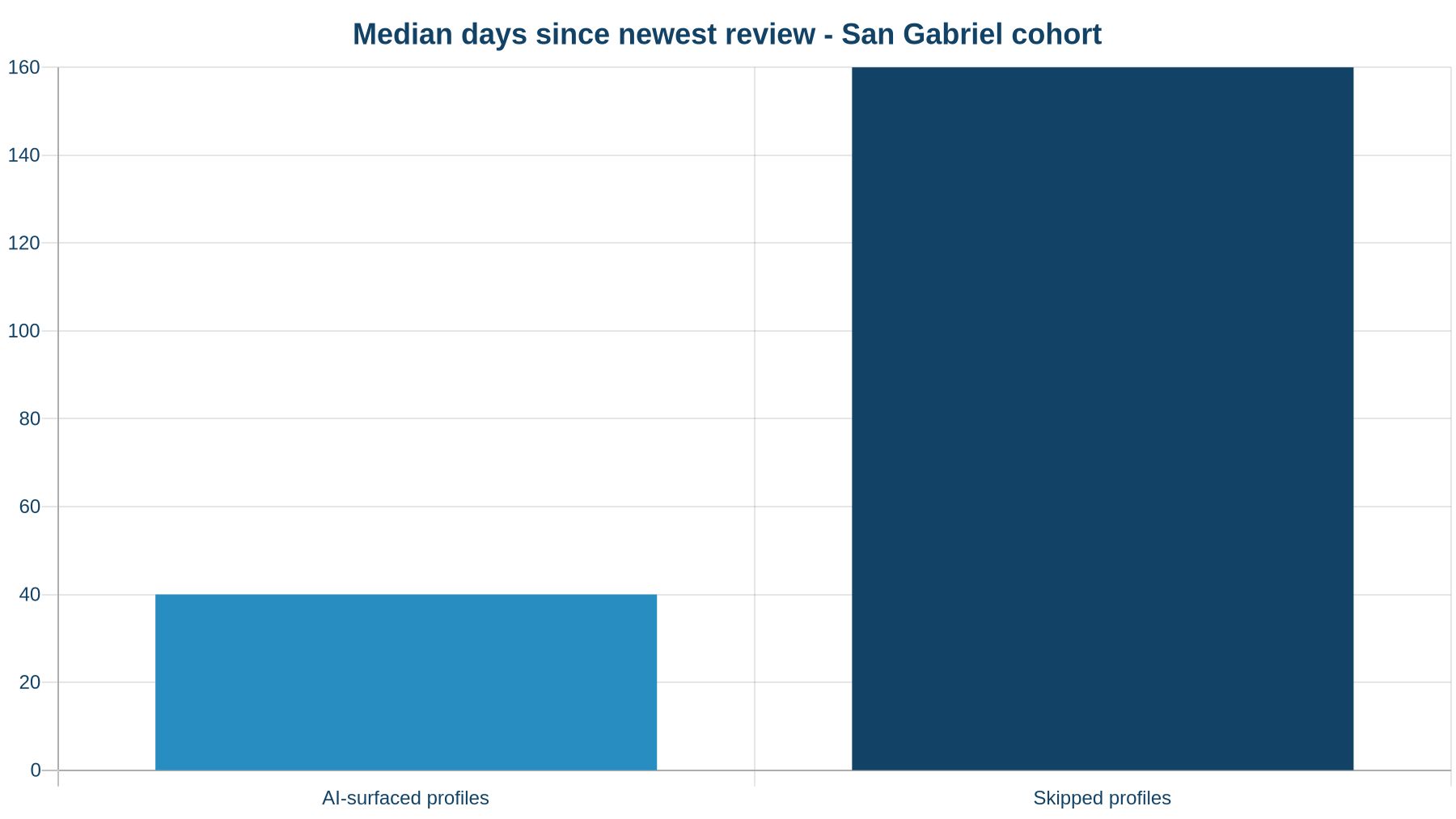
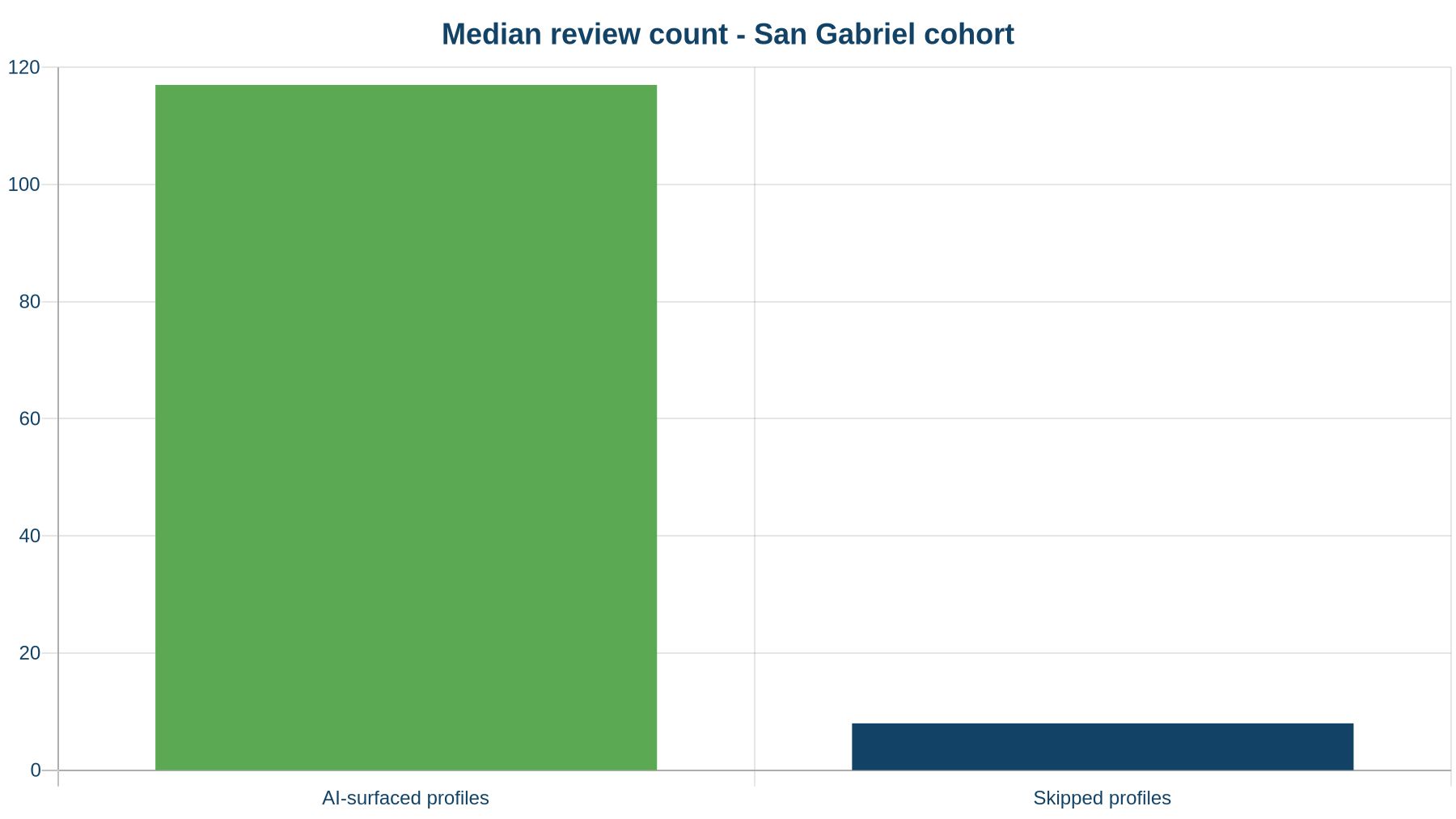
The review count gap is enormous. But the recency gap is what jumps out. Profile B, a skipped profile based in Rosemead, had 1 review with the newest posted 198 days ago. Profile A, based in San Marino, had consistent, recent activity — and that’s what the AI rewarded.
That is why where the cohort is based matters. The profile the AI chose for a San Gabriel search is in San Marino, and three quarters of the field is outside San Gabriel, so proximity did not decide this. Rating did not either: nine of the 12 profiles carry 4.8 stars or higher. What separated the one surfaced profile from the eleven skipped was recency. The floor for visibility in this market isn’t just having reviews. It’s having recent ones, consistently.
A 30-day review block in a market like this doesn’t just pause your momentum. It hands recency advantage to every competitor who kept their review flow clean.
The Right Way to Ask for Reviews
The practices that trigger blocks — QR codes at the counter, asking customers to review before they leave — aren’t inherently wrong. They’re just risky when they produce unnatural velocity patterns.
What works without raising flags:
Send the request after the job is complete and the customer is home. A text or email the same evening, or the next morning, produces reviews that look like organic post-service feedback — because they are.
Keep the volume steady, not spiky. If you’re finishing 15 jobs a week, a consistent 3-5 reviews per week is healthier than 0 for three weeks and then 20 in a day.
Don’t incentivize reviews. Google’s content policy is explicit: offering incentives such as payment, discounts, or free goods or services in exchange for a review is prohibited, and reviews gathered that way are among the types Google removes.
Don’t gate. Review gating, which the same policy describes as discouraging negative reviews or selectively soliciting positive ones, also violates Google’s guidelines and increases the likelihood of a block.
The goal is a steady drip of genuine post-job reviews, not a flood.
If you want a system that sends review requests automatically after each completed job — timed right, without creating the burst pattern that triggers blocks — that’s exactly what our reputation and review management service is built to do. Automated requests, professional responses, and monitoring so you catch problems before they compound.
What to Do Right Now If You’re Blocked
- File the appeal through Google’s support form, even knowing it probably won’t shorten the 30 days. Log the case.
- Audit how reviews were being generated. If you had a QR code at the counter and an employee incentive program running simultaneously, that’s likely the combination that flagged you.
- Pause the in-store push. Don’t generate more reviews through the same channels while the block is active — it won’t help and could extend scrutiny.
- Respond to every existing review while you wait. You can still reply. Doing so signals an active, engaged profile and keeps your presence warm for customers reading during the block period.
- Set up a post-job text sequence so that when the block lifts, your review velocity resumes through a channel that doesn’t pattern-match to manipulation.
Run your profile through our free Map Pack Grader to see where your review count and recency stand against the profiles currently winning in your city. The gap is usually more visible than owners expect — and knowing the number gives you a target to work toward once the block lifts.
The 30 days will pass. What you do with how you ask for reviews after that is what determines whether this happens again.