

TL;DR
How do I get Google Ads to send me better leads instead of just more of them?
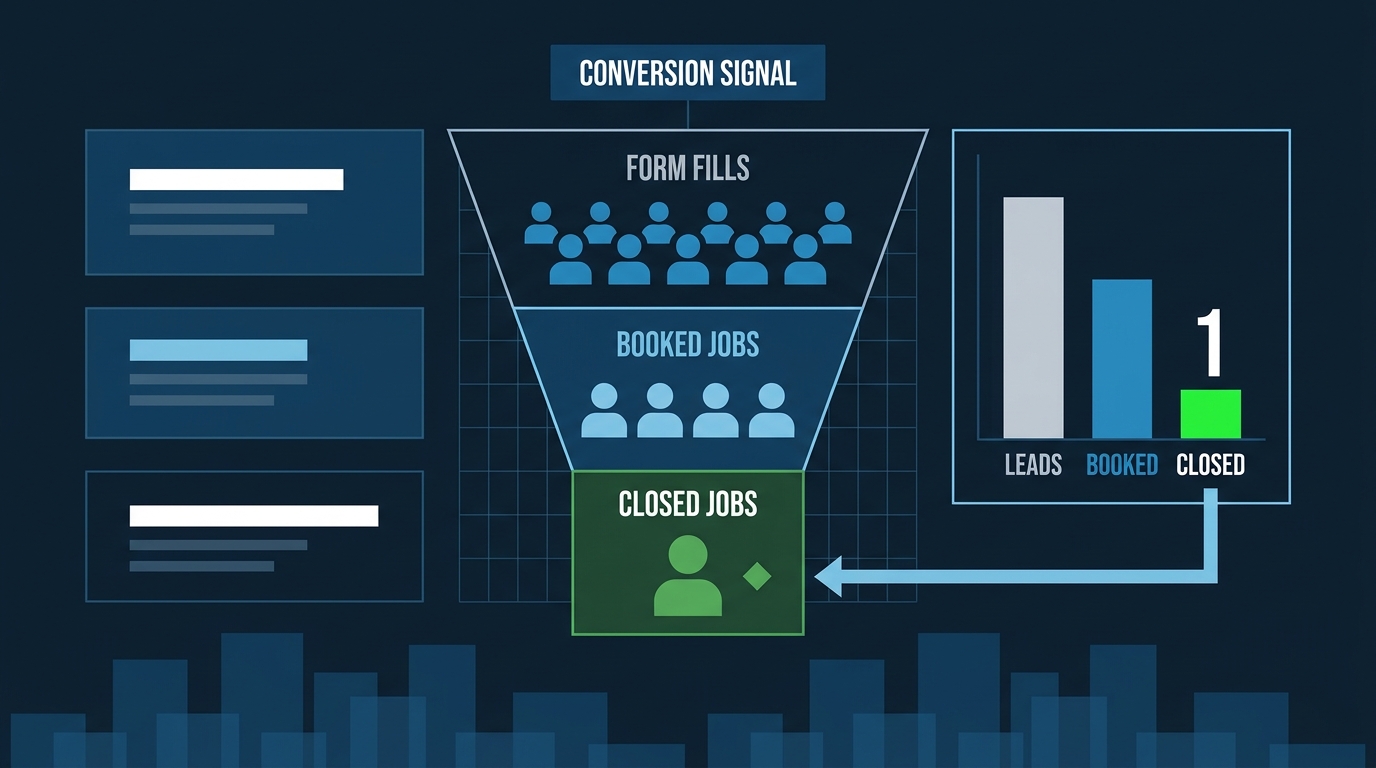
You have to teach the platform what a good lead looks like. That means assigning conversion values that reflect real job revenue, importing closed-job data from your CRM as offline conversions, and pruning search terms that attract browsers instead of buyers. The algorithm optimizes for whatever signal you give it — give it better signal.
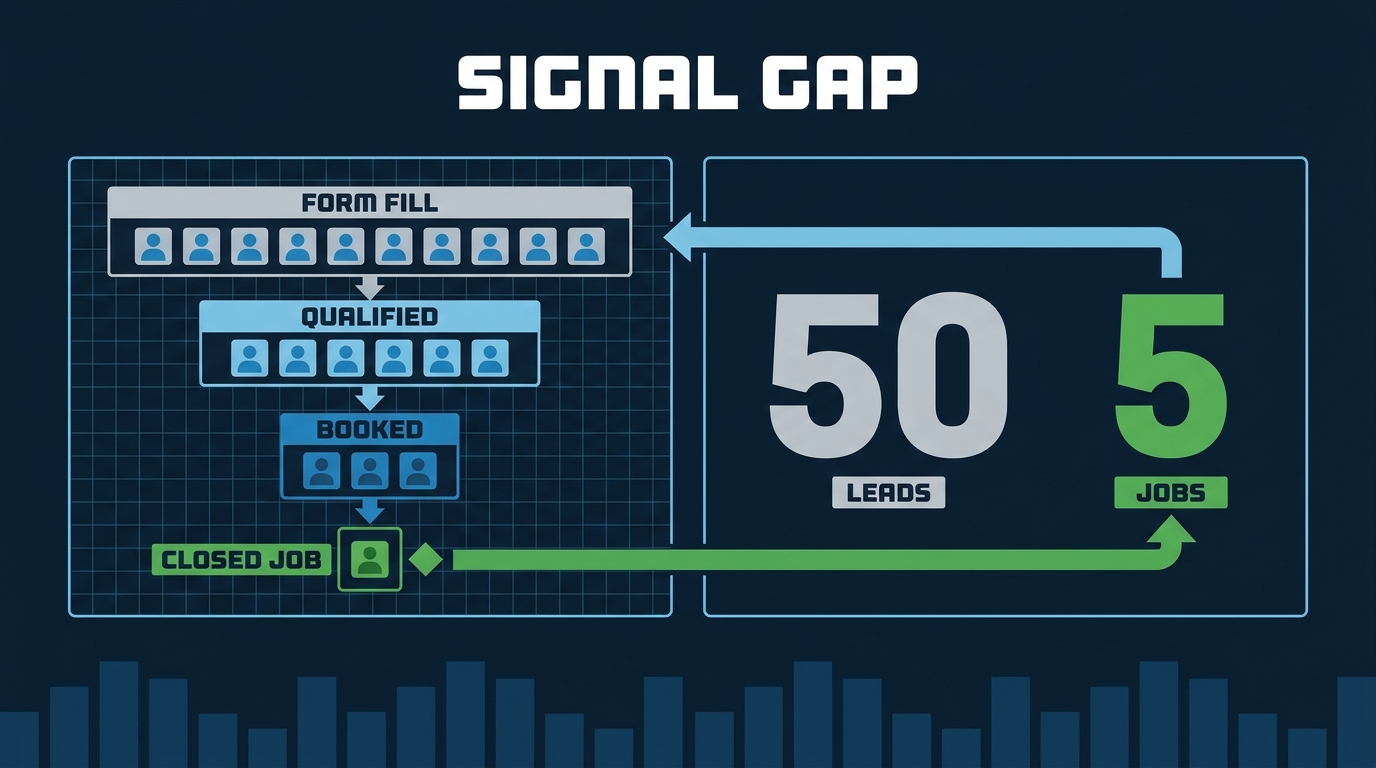
Say you’re a general contractor in Downey. Last month Google Ads delivered 50 form submissions. Your account dashboard is green — cost per conversion is on target, volume looks healthy. Then your sales guy tells you five of those turned into actual jobs. The other 45 were tire-kickers, wrong-city inquiries, and one guy who wanted you to build a treehouse for $300.
The platform wasn’t lying to you. It was doing exactly what you told it to do: find people who fill out forms. You just never told it which form fills actually pay your crews.
That’s the whole problem, and fixing it is simpler than most agencies make it sound.
The Platform Is Only as Smart as the Signal You Feed It
Google’s automated bidding — Smart Bidding, Target CPA, maximize conversions, whatever you’re running — learns from the conversion events you define. If a form submission is your conversion, every form submission looks identical to the algorithm. The guy who booked a $12,000 kitchen remodel and the guy who wanted a free estimate he’ll never act on both register as wins.
As PPC strategist Navah Hopkins explains it: “If every form fill is treated as the same conversion — equally valuable — the bidding system doesn’t inherently know that one became a strong sales opportunity and another went nowhere.”
The bidding system is optimizing. It’s just optimizing for the wrong thing because you haven’t told it the right thing.
What “Better Lead” Actually Means for a Trade Business
Before you touch a single campaign setting, get clear on your own definition. For a home-service business, the funnel usually looks like this:
Form fill / phone call — someone made contact. This is what most campaigns count.
Qualified lead — right city, right job type, real budget, real timeline. Maybe 40–60% of contacts if your targeting is decent.
Booked appointment — they said yes to a visit. Warmer, but still not money.
Closed job — signed contract, deposit taken, work scheduled. This is the only number your accountant cares about.
Most Google Ads campaigns for trades are optimized at the first level and measured at the last. That gap is where the waste lives.
The goal is to push your conversion signal as deep into that funnel as you can actually measure. If you can track booked appointments in your CRM, that beats tracking form fills. If you can track closed jobs, that beats booked appointments.
Three Ways to Feed Better Data Back to Google
1. Assign conversion values, not just conversion counts
Right now, your campaign probably counts every conversion as “1.” Google lets you assign a dollar value to each conversion event instead. You don’t need to be exact — you need to be directional.
A booked HVAC replacement is worth more than a booked tune-up. A roofing lead in a higher-income zip code — say, Pasadena — is likely worth more than the same lead from a zip code where you’re bidding out of market. Tell the platform that. Use value-based bidding — Target ROAS instead of Target CPA — and give each conversion type a value that reflects real revenue potential.
The algorithm will start chasing the higher-value signals. That’s the entire mechanism.
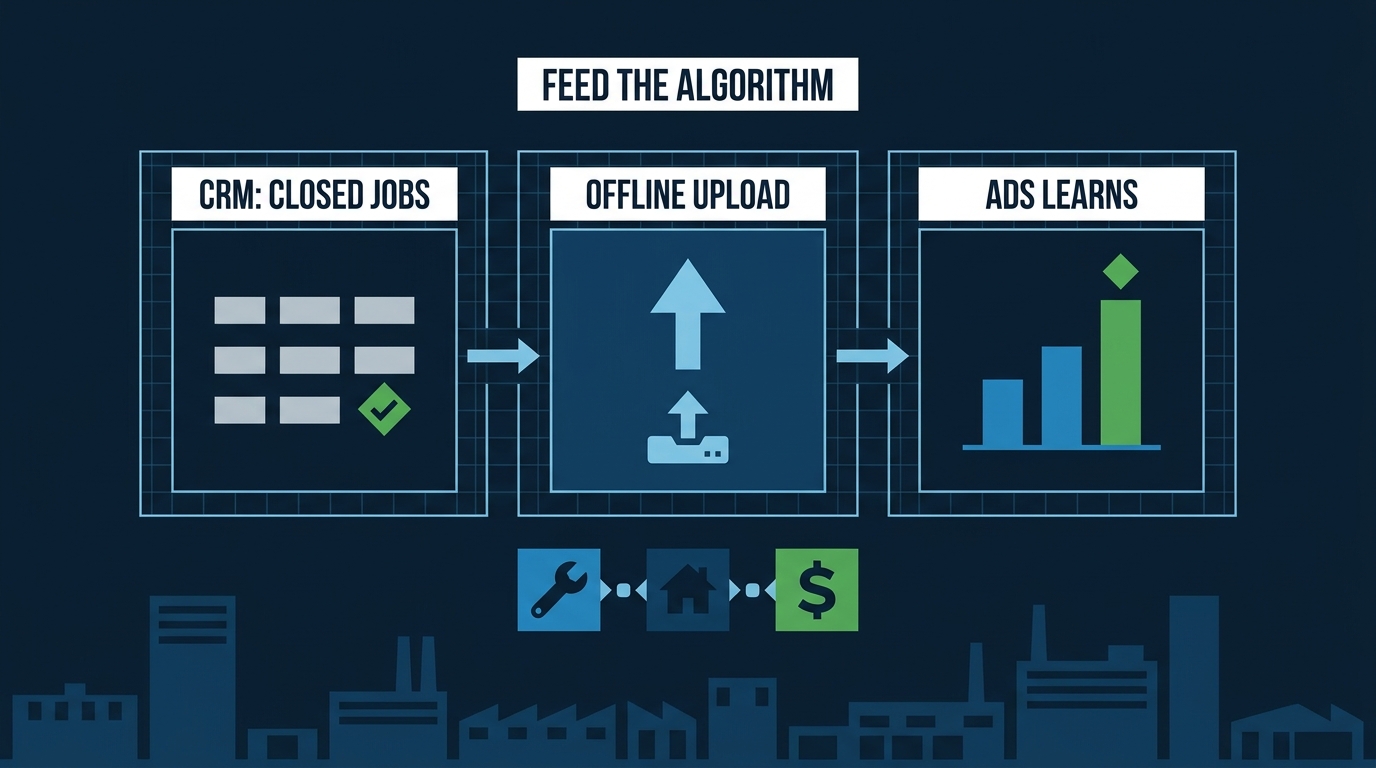
2. Import offline conversion data from your CRM
This is the move most trade businesses skip because it sounds technical. It’s not.
If you use a CRM — Jobber, ServiceTitan, Housecall Pro, or anything that logs which leads became booked jobs — you can export that data and upload it back to Google Ads as offline conversions. Google matches the closed job back to the ad click that generated the lead, and now the bidding system knows which clicks actually paid off.
Hopkins notes that this is where “real-world qualification and revenue data become particularly useful” — and that passing accurate conversion values is “the best signal any ad platform can work off of.”
You need a minimum volume for this to work. Google recommends at least 30 conversions per month at the event you’re optimizing toward before Smart Bidding has enough data to make reliable decisions. If your closed-job volume is lower than that, optimize toward booked appointments and manually review which ad groups are producing the closed work.
3. Tighten your negative keyword list before anything else
Better signal helps the algorithm learn. But if your ads are showing for searches that will never produce a job, no amount of signal-feeding fixes that.
Pull your search terms report. Look for the queries that generated clicks and no conversions over the last 90 days. Common culprits for trade businesses:
- “DIY” anything — someone fixing their own AC is not calling you
- “How to” queries — informational, not transactional
- Brand names of your suppliers or manufacturers
- City names outside your actual service area
- “Free” attached to anything you don’t offer for free
Add these as negatives at the campaign or account level. This step alone cuts a significant share of wasted spend before you touch a bid strategy.
The Patience Problem
Here’s what kills this approach before it works: impatience.
When you shift from optimizing for form fills to optimizing for booked appointments or closed jobs, your conversion volume drops — because you’re now counting fewer things as conversions. The dashboard looks worse. A lot of business owners or their agencies panic and revert.
Don’t. The algorithm needs time to relearn. Give a changed bidding strategy at least four to six weeks before judging it. Watch cost per closed job, not cost per lead. If you’re closing more jobs at a lower cost per job, the strategy is working even if the lead count looks lower.
This is also why alignment with whoever answers your phones matters. Brief your sales team before you switch strategies — show them the new cost-per-closed-job metric so they’re evaluating the same number you are. If they’re still applying old assumptions about lead quality — “these Google leads are always bad” — to leads that have actually gotten better, you’ll get a false negative on a strategy that’s working.
One More Thing: AI Is Already Shaping Who Calls You
Fixing your conversion signal improves the leads Google Ads sends you — but a growing share of high-intent buyers never click an ad at all.
A growing share of your future customers are researching contractors in ChatGPT, Google’s AI Overviews, and Perplexity before they ever click an ad or visit your site. Research tracking 108 million sessions found that visitors arriving from AI tools convert at roughly five times the rate of typical search visitors — they’ve already done their comparison shopping inside the chat window.
That matters for lead quality because the leads who find you through AI-assisted research often arrive pre-sold. They’re not shopping five contractors; they’re calling you specifically. Those leads close at higher rates and need less hand-holding.
Your Google Ads strategy and your AI visibility aren’t separate problems. A business with strong reviews, a well-built Google Business Profile, and consistent structured information online shows up in both places. Use our free Does AI Recommend You? tool to see whether ChatGPT, Perplexity, and Gemini are naming your business when someone in your city asks for a contractor recommendation — or naming your competitors instead.
What to Do Monday Morning
Pull your Google Ads search terms report for the last 90 days. Filter for clicks with zero conversions. Add the obvious non-buyers as negatives — DIY searches, out-of-area cities, informational queries. That takes 30 minutes and stops the bleeding immediately.
Then talk to whoever manages your CRM about whether closed-job data can be exported and uploaded back to Google as offline conversions. If you’re running campaigns and not doing this, you’re training the algorithm on the wrong outcomes and wondering why the leads keep getting worse.
Our Google Ads management service includes conversion tracking setup, offline conversion imports, and negative keyword builds as part of the baseline — not as an add-on. If you want a read on what your current campaigns are actually producing, run your numbers through our free Lead ROI Calculator: put in your job value and close rate and see what your cost per closed job actually is, not just cost per lead.
That number is usually the one that changes the conversation.