


TL;DR
Why did my Google Business Profile get suspended and how do I get it back?
Suspensions are either soft (profile still visible, just unmanageable) or hard (removed entirely). Common triggers include duplicate listings, virtual office addresses, and algorithmic sweeps. Fix the underlying violation first, gather business-license and address documentation, then submit through Google's appeals tool — never create a duplicate while you wait.
One morning your Google Business Profile is gone. No map pack, no phone calls, no reviews showing up — nothing. Or maybe you can still find it if you search your exact business name, but you can’t log in and manage it. Either way, the leads dried up and you have no idea what you did wrong.
Google won’t tell you what triggered it — you’re expected to figure it out, fix it, and convince them to let you back in. Here’s how.
Google’s suspension system is not designed to be fair. It’s designed to be scalable. That means legitimate HVAC companies and roofing contractors get caught in algorithmic sweeps while spam listings in the same category survive for months. Knowing that changes how you approach the appeal — you’re not correcting a mistake, you’re proving your legitimacy to a system that assumed the worst.
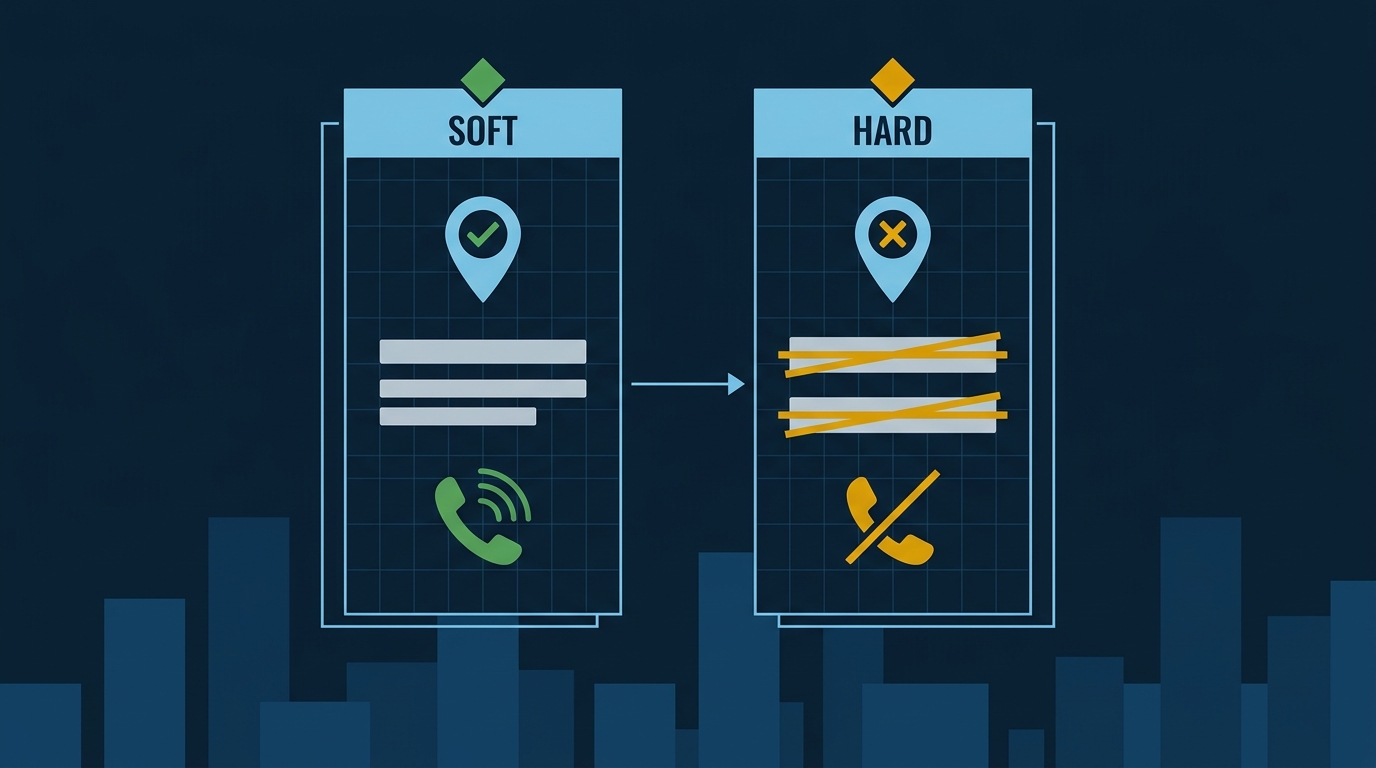
Soft vs. Hard: These Are Not the Same Problem
Before you do anything else, figure out which type of suspension you have. They require different responses.
A soft suspension means your profile still appears on Google Search and Maps. Someone searching “HVAC repair Santa Monica” might still find you. Your reviews are still visible. But you’ve lost the ability to manage the listing — it shows as unclaimed, with a “Claim this business” link on Maps. According to Sterling Sky, a soft-suspended profile usually doesn’t see a significant drop in rankings. You’re still generating leads, you just can’t respond to reviews or post updates.
A hard suspension is the one that kills revenue. The profile is removed from Search and Maps entirely. It doesn’t show up for any search — branded or generic. For a plumbing or roofing company that depends on map-pack calls, this can be catastrophic. A thin market makes it worse, not better: within 5 km of Bell Gardens there are only 0.17 general contractor profiles per square kilometer, so a profile that disappears isn’t one of fifty, it’s one of thirteen, and its calls go straight to the handful that are left. Sterling Sky documented a multi-location plumbing business that closed an entire location and laid off 10 plumbers after a hard suspension choked off incoming calls.
Know which one you have before you start the appeal process.
The Five Reasons Your Profile Got Flagged
Google’s algorithm, a competitor’s report, or your own edits can trigger a suspension. Here are the causes that show up most often for home-service businesses.
1. A duplicate listing exists. If you or a past employee created a second profile — maybe for a second truck, a second service area, or because you forgot the login — Google may suspend both. This is one of the most common triggers for trades businesses that have changed ownership or moved locations.
2. You used a virtual office address. This one catches a lot of contractors. You rented a professional address in a better zip code, listed it on your GBP, and assumed it was fine since you’re a service-area business anyway. It’s not fine. Google’s guidelines are explicit: if your business doesn’t actually operate from that address — staff present, open during business hours, able to receive walk-in customers — the address is not eligible for a Business Profile. A mail-forwarding service doesn’t count. A receptionist hired by the building doesn’t count. If your crew drives from a home base or a real shop, use that address (or hide the address and set a service area).
3. Your business category is in a high-risk vertical. Locksmiths and garage-door companies get hit with algorithmic suspensions more than almost any other trade. Google has seen enough spam in those categories that profile edits — even legitimate ones — can trigger an automatic review. If you run a locksmith or garage-door company anywhere in LA County, be conservative with edits and document everything.
4. Someone reported your profile. Any Google Maps user can flag a listing. Depending on that user’s trust level in Google’s system, the report alone can trigger a suspension — even if your profile is perfectly compliant. A competitor with a grudge, a former employee, a disgruntled customer: any of them can start this process. You can’t fully prevent it, but a well-documented, fully verified profile is harder to kill.
5. An algorithmic sweep caught you. Google runs quality-control passes that remove profiles it can’t verify as legitimate. No edits required. If your profile lacks strong signals of a real, operating business — consistent NAP across the web, photos, recent reviews, hours — it’s more vulnerable.
What a Suspended Profile Costs You in the Real Map Pack
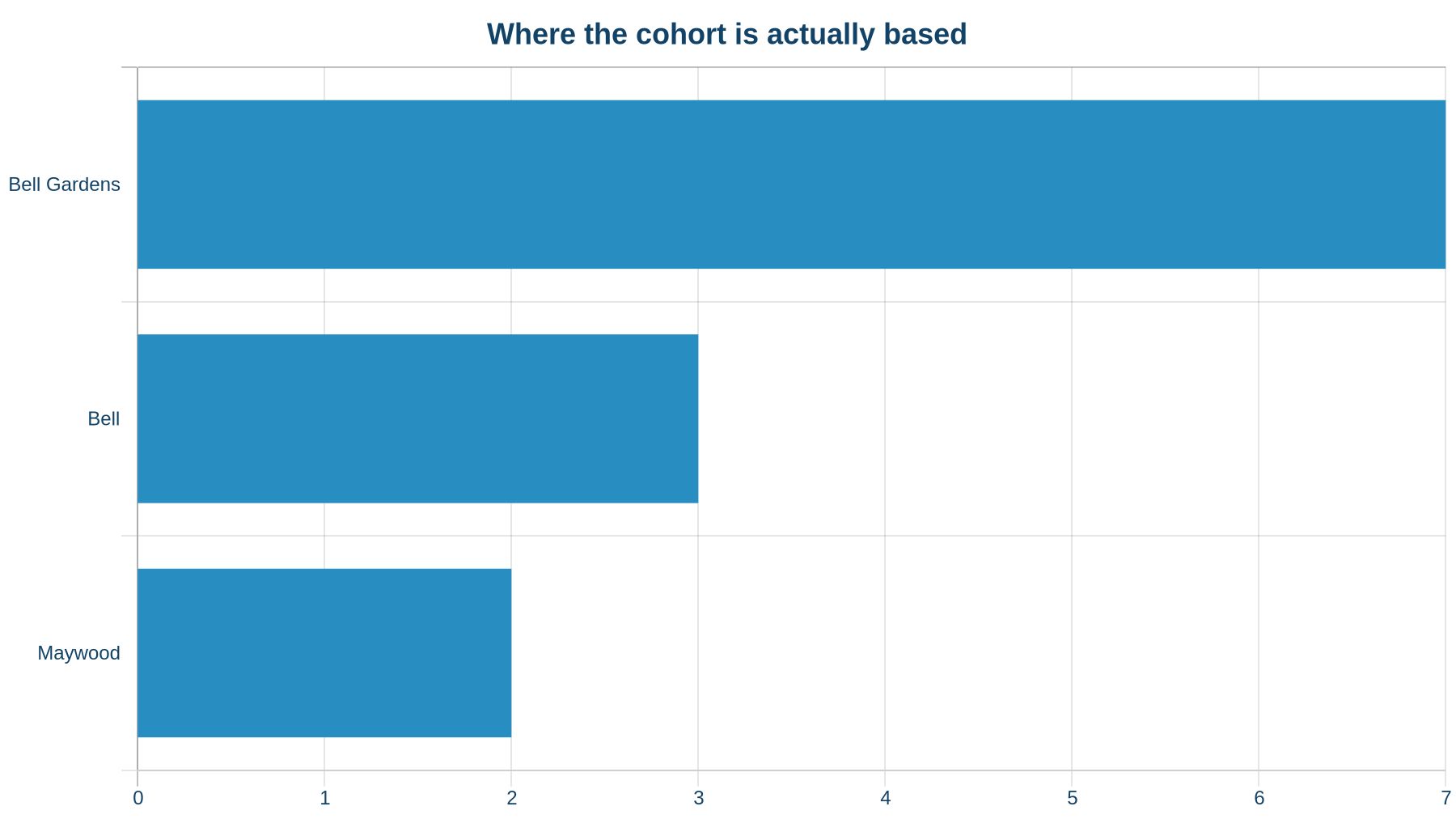
Here’s where this stops being abstract. We pulled data on 13 general contractor profiles competing for searches in Bell Gardens. Seven of the 13 were based in Bell Gardens itself; of the six outside, three were in Bell and two in Maywood. With only 0.17 profiles per sq km within 5 km of the city, and nearly half the cohort operating from a neighboring city, proximity alone isn’t deciding who gets surfaced — review volume is.
When we asked Google’s Maps-grounded AI for a general contractor in Bell Gardens, it surfaced just 2 of those 13 profiles.
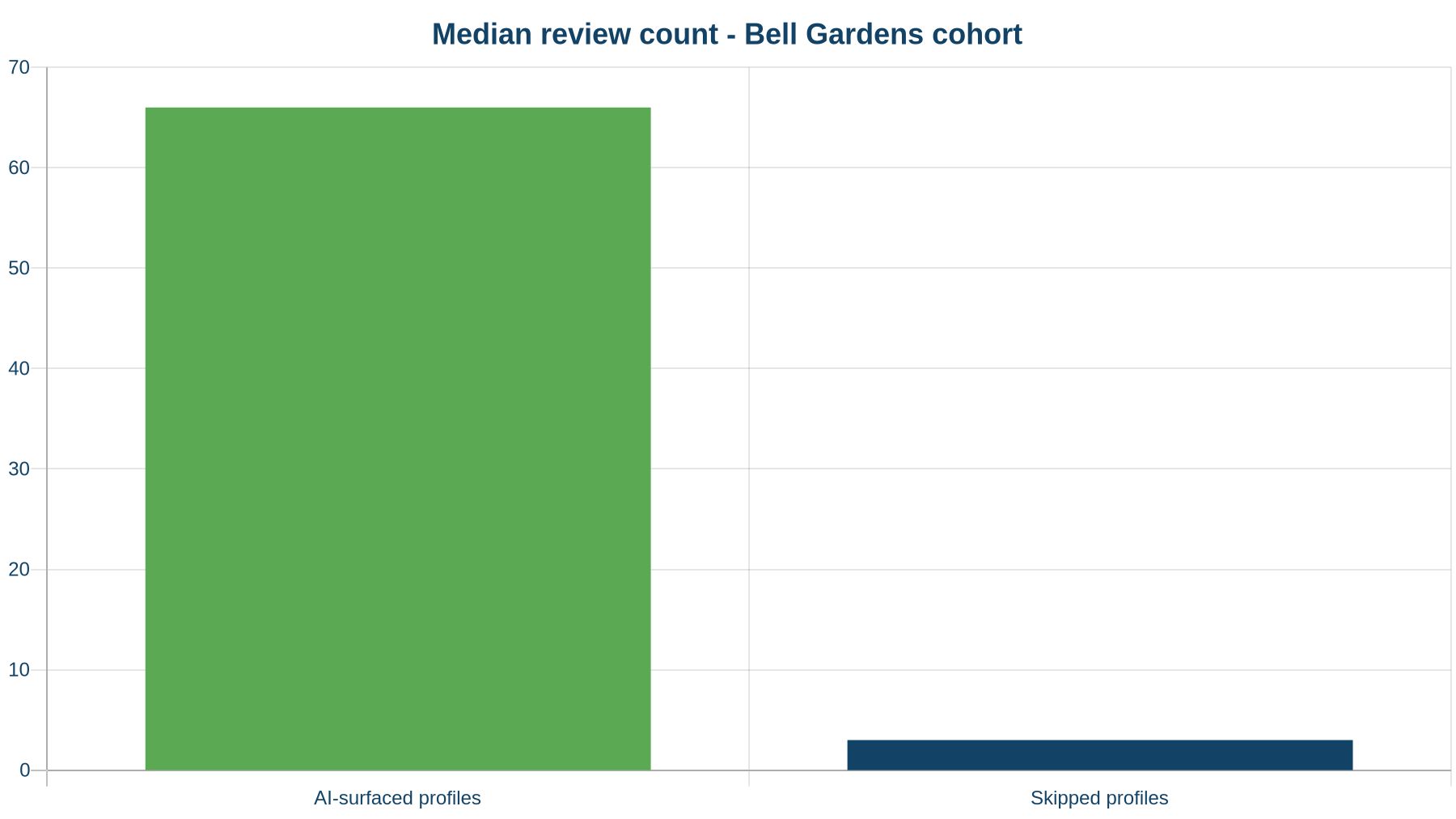
The two profiles that got surfaced had a median of 66 reviews. The 11 that were skipped had a median of 3. Profile A — surfaced, based in Maywood — had 106 reviews. Profile B — skipped, also based in Maywood — had 3 reviews, hours set. Same city of operation. Completely different outcomes.
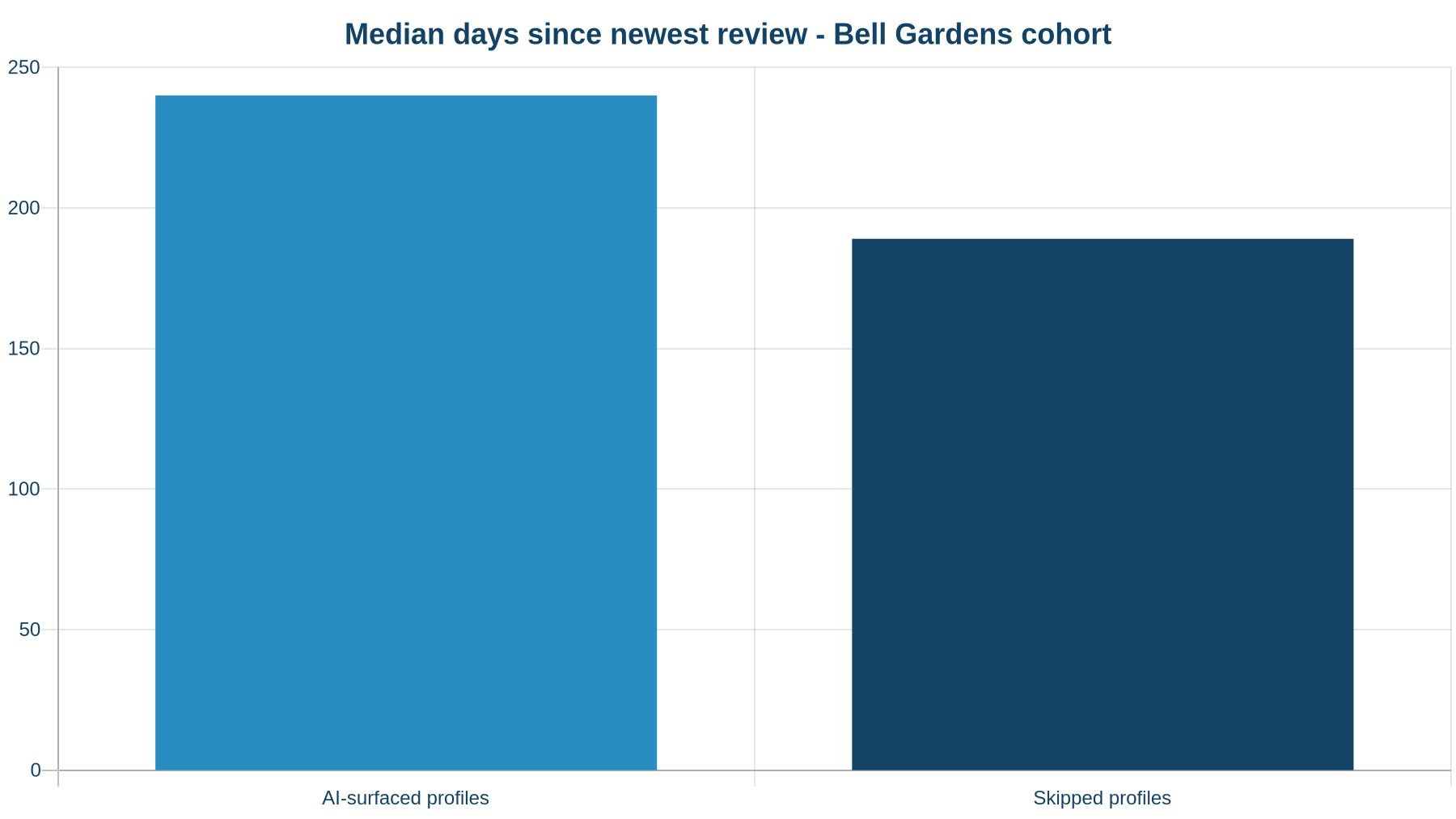
On review recency: the surfaced profiles had a median newest-review age of 240 days; the skipped profiles actually had fresher reviews on average, at 189 days. That detail matters. Recency alone didn’t drive surfacing — volume did.
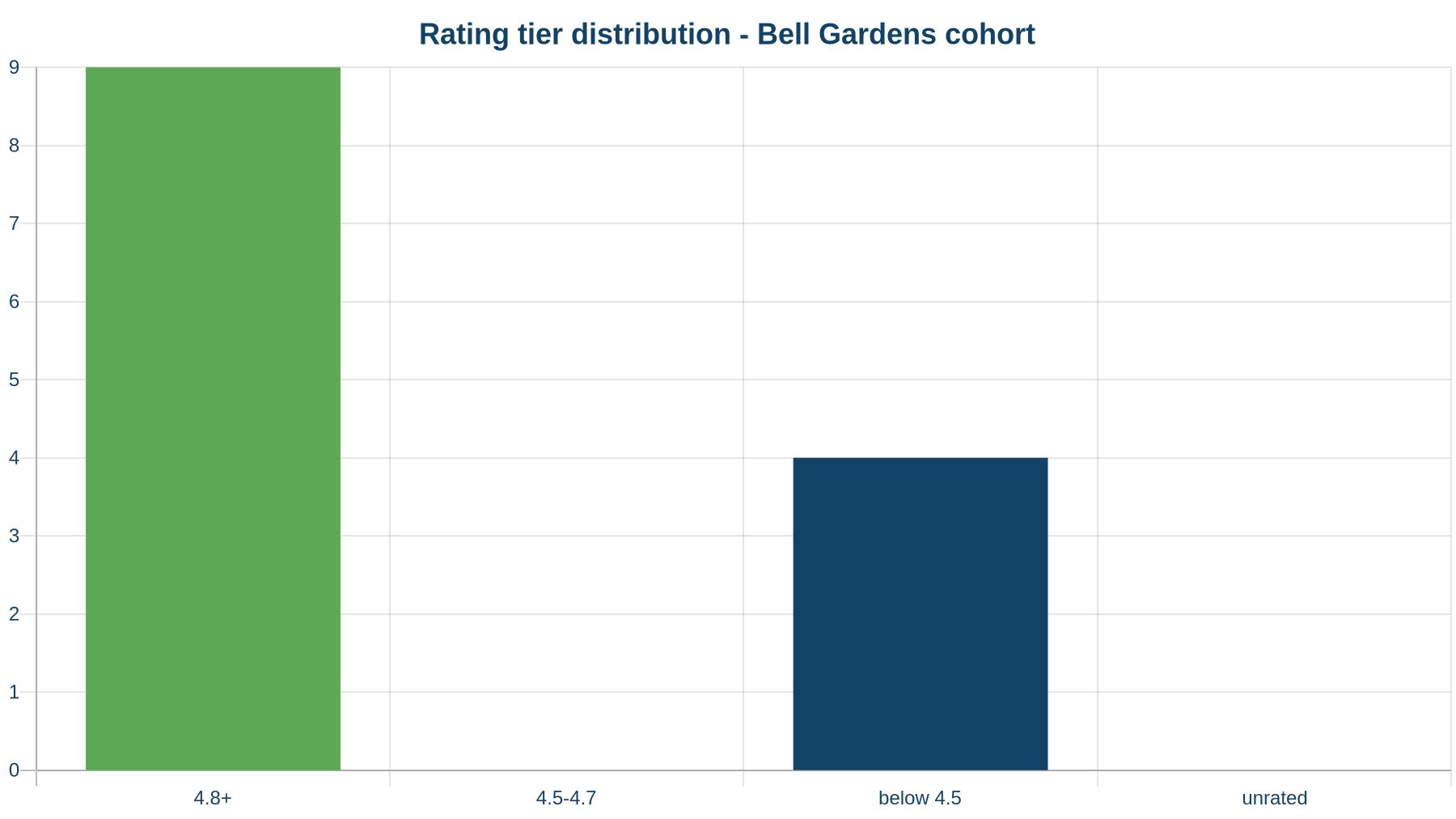
Nine of the 13 profiles carried ratings of 4.8 or above, and the other four rated below 4.5. None of those four were surfaced — but both surfaced profiles had 4.8+ ratings, and so did 7 of the 11 skipped ones. A weak rating didn’t explain the skips, and a strong one didn’t earn a spot. Rating is table stakes. Volume is the differentiator.
The point: a suspended profile that drops out of the map pack doesn’t just lose a ranking. It loses the review momentum that makes a profile competitive in the first place. Every week you’re suspended is a week your competitors are pulling further ahead.
How to Build a Reinstatement Appeal That Actually Works
Google’s reinstatement process runs through the Business Profile appeals tool. Here’s what to prepare before you submit.
Fix the problem first. Submitting an appeal before correcting the violation is wasted time. If you had a virtual office address, change it. If there’s a duplicate profile, remove it. If a suspended user account was managing your profile, remove that user. Google reviews the profile as it stands when they evaluate the appeal — not as it stood when you filed it.
Gather hard documentation. The bar is higher than most people expect. Collect:
- Business license (city or county)
- State contractor’s license (critical for HVAC, electrical, plumbing, roofing)
- Utility bill or lease agreement for your operating address
- Bank statement or tax document showing the business name and address
- Photos of your shop, your trucks with signage, your crew at work
- Anything that proves a real business operates from a real location
Write a clear, factual appeal statement. Don’t argue with Google. Don’t threaten. Explain what your business does, where it operates, how long it’s been running, and what documentation you’re attaching. One paragraph. No emotion. You’re not explaining yourself to a human who will give you the benefit of the doubt — you’re satisfying a checklist reviewed by someone who starts from suspicion.
Expect a wait. Response times vary significantly. Some appeals resolve in days; others take weeks. Do not create a duplicate profile while you wait — that’s the single fastest way to make a hard suspension permanent.
One Situation Where You Shouldn’t Reinstate
If your business has changed significantly — you moved, rebranded, merged with another company — reinstating the old profile may not be the right move. Sterling Sky documents cases where consolidating profiles or starting fresh with a clean, properly verified listing produced better long-term results than fighting to recover a flagged one. Here’s the rule: if the suspended profile has fewer than 20 reviews and is tied to an address you no longer use, start fresh. Building a clean profile correctly is almost always faster than fighting the appeal, and you’re giving up very little. Above that review count, the history is worth the fight.
What to Do Monday Morning
If your profile is suspended: stop, don’t touch it further, and don’t create a duplicate. Identify the type (soft or hard), audit your profile for the five triggers above, fix the underlying issue, gather your documents, and submit through the appeals tool.
If your profile is live right now: use this as a checklist. Check that your address is your actual operating address. Check for any duplicate profiles under old email accounts. Check that your business category is accurate. A profile that follows Google’s guidelines is far harder to suspend — by algorithm or by competitor report.
Our Google Business Profile management service includes ongoing compliance monitoring so you’re not discovering a suspension the morning the phone goes quiet. If you want to see how your profile stacks up against the map-pack leaders in your city right now, run it through our free Map Pack Grader — it shows you the gaps in reviews, photos, and profile completeness that make a listing vulnerable.