

TL;DR
How do I know if spending $2K/month on marketing will actually pay off?
Five numbers decide it: average job value, profit margin, close rate, cost per lead, and budget. If cost-to-win-a-customer beats profit-per-customer you lose money at any budget. Our free calculator runs the math and gives a verdict; raising close rate or lowering cost per lead are the levers that flip it.
You ran the Google Ads Cost tool. You saw it’d take about $3,600/month to hit 20 leads for your trade in your city. Fair enough.
Then you sat there for a minute and realized you don’t actually know if 20 leads/month makes you money. If your close rate is 15% and you can only book three of those twenty, and each job clears $200 in profit, you just spent $3,600 to make $600. If your close rate is 35% and you book seven, and each job clears $400 in profit, you spent $3,600 to make $2,800. Same lead cost. Same market. Totally different business.
Nobody teaches home-service owners this math. You either learn it by losing money for six months or you never learn it and you either keep guessing whether marketing works or you convince yourself it doesn’t and stop advertising entirely.
This post walks through the specific math that determines whether marketing works for your business — and how to plug your own numbers in to see the answer in 30 seconds.
Marketing only works if the math works
The mistake most home-service owners make is optimizing the wrong number.
They chase “cost per lead” — $50 sounds cheap, $200 sounds expensive. They ignore the two numbers that actually determine profitability: what percentage of those leads becomes a paying customer, and what profit each customer generates.
Here’s the reality. If you’re paying $50 per lead and closing 30% of leads at a $300 profit per job, you’re winning. Every three leads costs you $150 and produces roughly one customer who nets you $300. That’s $150 profit per customer after marketing. Scale it up and you’re printing money.
If you’re paying the same $50 per lead but only closing 10% of leads at a $200 profit per job, you’re losing. Every 10 leads costs $500 and produces one customer who nets you $200. That’s $300 lost per customer. Doubling your budget doubles the loss.
Same lead cost. Different math. Different outcome. The cost per lead is just one variable in a five-variable equation, and if you’re not running the whole equation, you’re guessing.
The five numbers you need
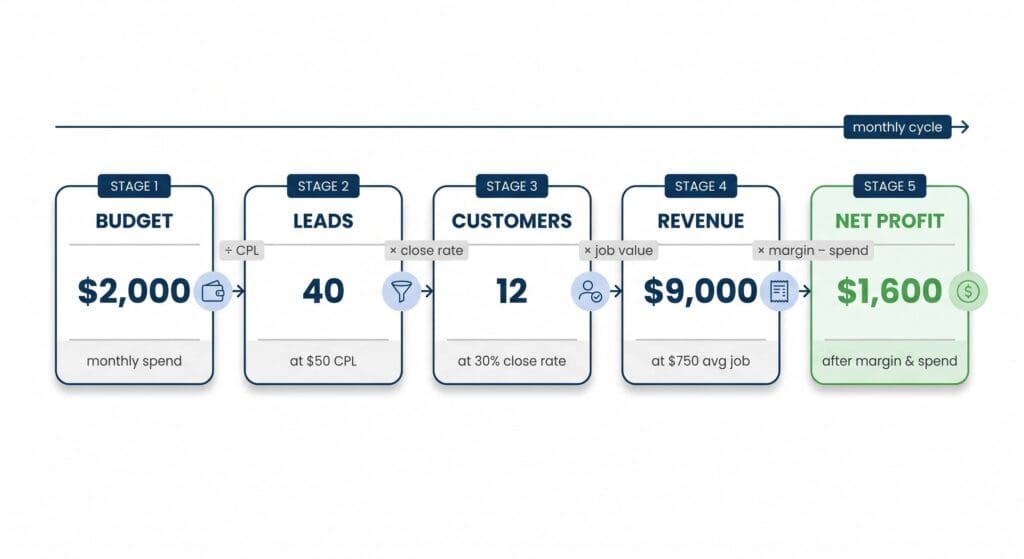
The tool asks for five numbers about your business. If you don’t know these five, you can’t budget marketing at all — because the equation doesn’t work without them.
Average job value. Total revenue per booked job. Not profit — revenue. If you charge $850 for a typical drain cleaning, that’s $850. Look at your last thirty invoices and average them if you don’t already track this.
Profit margin. What percentage of revenue is actual profit after materials, labor, overhead, gas, and the rest. Most home-service businesses run 25-50%. Guessing is fine here if you don’t know — 30% is a reasonable middle for most trades.
Lead → sale close rate. What percentage of qualified leads become paying customers. Not calls answered — customers who actually pay you. Home-service typical is 20-40% depending on trade, response time, and how well the lead was qualified upfront.
Cost per lead. What you pay for each qualified lead. If you’re running Google Ads, this is your Google Ads spend divided by leads generated. If you’re buying leads from Angi or Thumbtack, this is the per-lead price they charge. If you don’t know your CPL yet, plug in the average CPC from your Google Ads Cost tool result — that’s a reasonable proxy.
Monthly marketing budget. Your total planned monthly spend across all channels. This is the number you’re trying to justify.
Those five numbers, plugged in, tell you whether the whole thing works.
What the tool actually shows
Plug in your five numbers to the Lead ROI Calculator. Results appear immediately once you’re through the gate — no waiting, no data lookup, just math.
You’ll get:
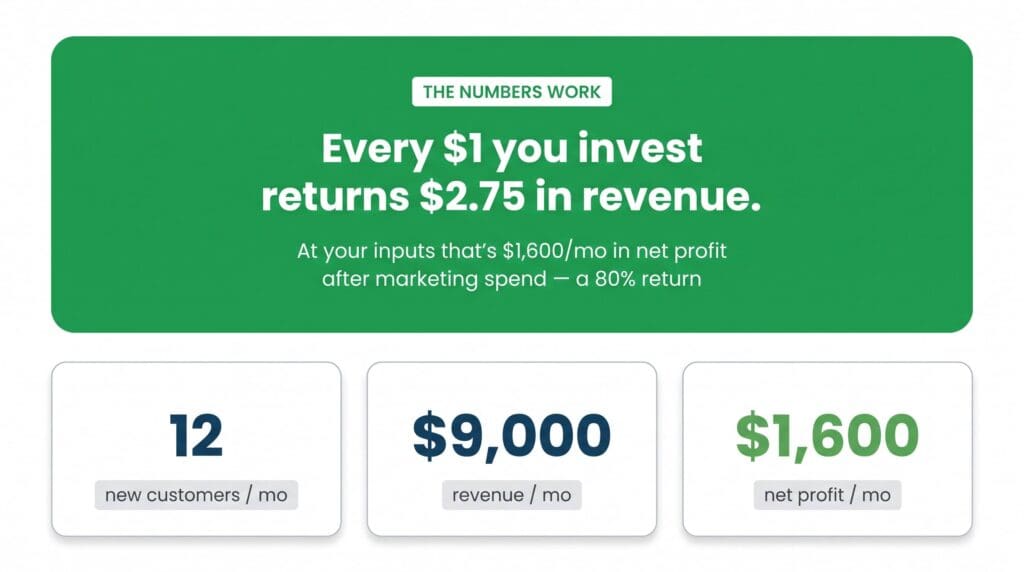
- A verdict card at the top: green “The numbers work” with your ROAS (revenue per $1 spent) and monthly net profit, or amber “Not yet — but close” with the exact loss and what it’d take to fix it.
- Three stat cards: how many new customers per month your budget produces, how much revenue, and how much net profit after marketing spend (color-coded green if positive, red if negative).
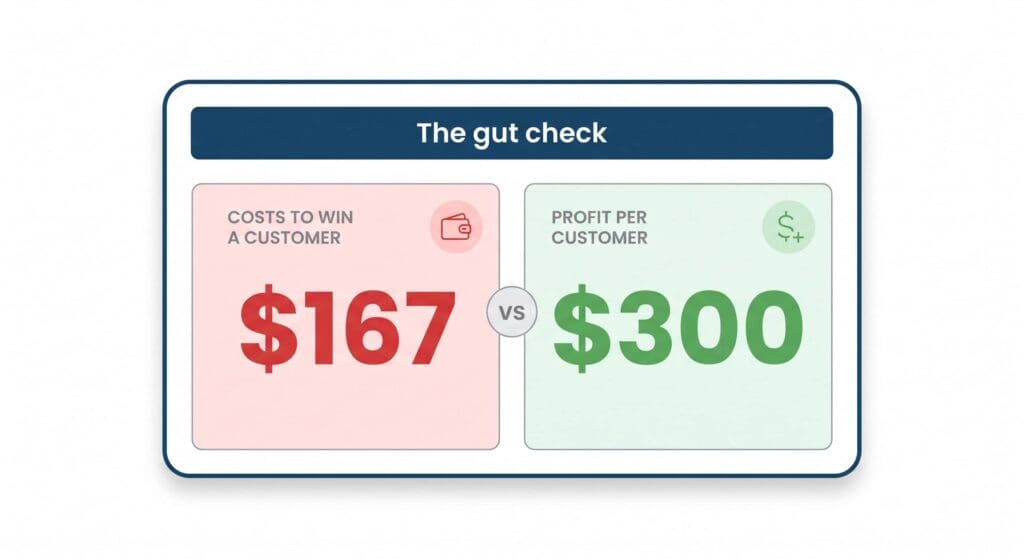
- A gut check side-by-side: the cost to win a customer (in red) vs the profit per customer (in green). If cost > profit, you’re losing money on every customer. If profit > cost, every customer is real profit. This is the single most useful comparison in the whole tool.
- If unprofitable, specific break-even targets: the close rate you’d need at your current cost per lead, or the max cost per lead you can pay at your current close rate. Not “improve your marketing” — actual specific numbers to hit.
Free — one name and email at the gate, then the calculator opens and the results update as you change any input. That’s the trade: you get the math, we get to know who to follow up with.
The insight most owners miss: profitability is independent of budget
The single most important thing this tool teaches — the thing most home-service owners never internalize — is that whether marketing works is a function of your unit economics, not your budget size.
Doubling your monthly marketing budget doesn’t make marketing profitable. If the numbers don’t work at $2,000/month, they don’t work at $4,000/month — you just lose twice as much. Marketing agencies who promise “we’ll help you scale” without asking about your close rate and job value are asking you to scale a losing operation.
Conversely, if the numbers DO work, then more budget = proportionally more profit. Every incremental $1,000 of spend produces the same ROAS. Which is why the right question is never “how much should I spend?” — it’s “do the per-lead economics pencil at all?” Only after that answer is yes does budget size become the question.
This is what the calculator strips down to. It doesn’t ask you what your budget is because that’s the wrong first question. Well, it does ask — but it uses your budget only to project the monthly customer count and dollar profit. The verdict (green or amber) is set entirely by the ratio of cost per customer to profit per customer. Change your budget and the customer count changes; the ratio doesn’t.
Two levers turn “no” into “yes”
When the calculator hands you an amber verdict — you’d lose money at these numbers — it also hands you two specific targets to hit. Not “improve your marketing.” Actual numbers.
The close rate you’d need at your current cost per lead. If you’re paying $80 per lead with a $200 profit-per-customer, you need to close at 40% to break even. If you’re at 25%, you need to move 15 percentage points. Sales script tweaks, faster response times, and better upfront qualification are the fastest levers here. Home-service close rates in the 30-40% range are achievable for owners who treat the phone like a job.
The max cost per lead you can pay at your current close rate. If you’re closing 30% and your profit per customer is $250, the most you can pay per lead is $75. If Google Ads is bringing you leads at $50 CPL, great. If Angi is charging you $120 CPL, you’re upside-down and the math will never work until you switch channels or move a lever.
The calculator won’t fix either of these for you. But it tells you which one is the fastest path back to profit — and how far you have to move it.
Companion: use this with the Google Ads Cost tool
If you haven’t seen it yet, our Google Ads Cost tool gives you the realistic cost-per-lead for your trade in your California city. Plug that number into the “cost per lead” field of this calculator and you’ll see whether Google Ads specifically pencils out for you.
Together the two tools close the money loop:
- Google Ads Cost answers “what will marketing actually cost me?”
- Lead ROI Calculator answers “does it pay off at that cost?”
If the ROI calculator says the numbers don’t work at your realistic CPL, you know before you spend a dollar. If it says the numbers work, you know exactly how many customers to expect and how much profit — the ballpark you’ll actually see if you build the campaigns right.
Check yours in 30 seconds
Plug your five numbers into the Lead ROI Calculator. You’ll see the same math we run when we plan out a marketing engagement with a new client. Free — name and email at the gate, then the calculator opens up and updates in real time as you change any input. No upsell inside the tool.
Two things to look for the moment your result loads:
- The verdict card at the top — green or amber tells you whether your current numbers work at all
- The gut check comparison — if cost-to-win is higher than profit-per-customer, no budget size will save you
If you don’t know one of the five inputs, guess sensibly. The tool updates as you dial it in, so you can see how sensitive your ROI is to each variable and figure out which one you need to nail down first.
How City Boost helps
We do Lead Management and Automation for home-service businesses across the SGV — the sales process, the follow-up cadence, and the lead-qualification systems that turn the numbers in this calculator from amber to green. If your calculator result comes back saying you’d need to move your close rate from 20% to 35% to be profitable, that’s the exact scenario we help owners work through — because most of the time it’s not about spending more on marketing, it’s about closing more of the leads you already get.