
Google Ads ‘Strongest Match’ & Limited Ad Serving: What Home-Service Advertisers Need to Know
Google's new Limited Ad Serving policy can quietly throttle your Google Ads visibility — and a general contractor in Downey or Bell Gardens could wake up to gutted impressions without a single warning email. Here's what's actually triggering it and how to fix it.
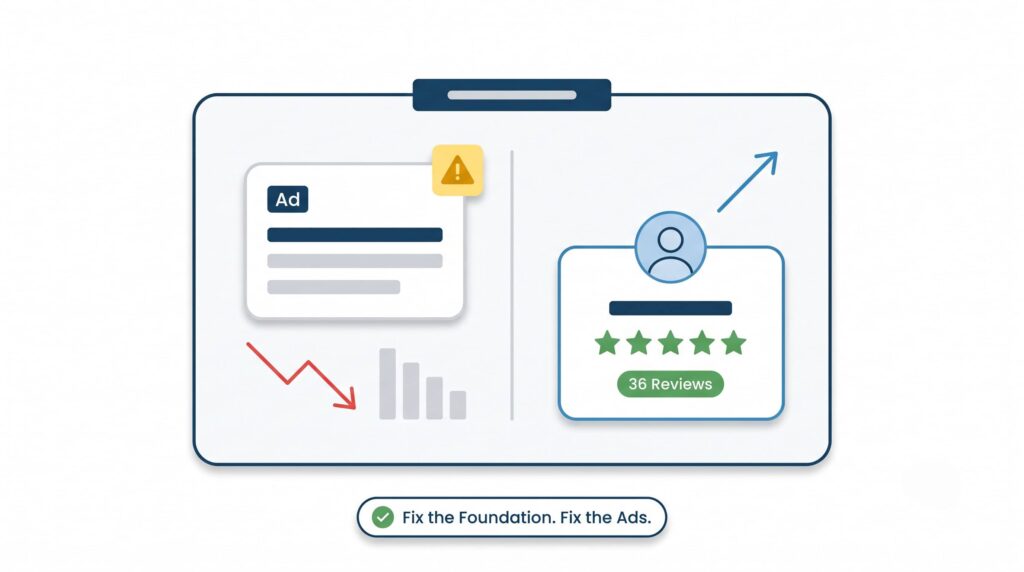
You’re running Google Ads. The campaign looks fine — no policy violations, no disapproved ads, no angry red flags in the dashboard. But impressions are down 40%. Calls have slowed to a trickle. You ask your agency what happened and they say “Google’s algorithm.” That’s not an answer.
Here’s what’s actually going on.
Two changes that hit home-service advertisers hard
Google has been rolling out two separate but related changes to how search ads work. If you run paid search for a contracting, HVAC, plumbing, or roofing business in the SGV or Southeast LA, both of them affect you directly.
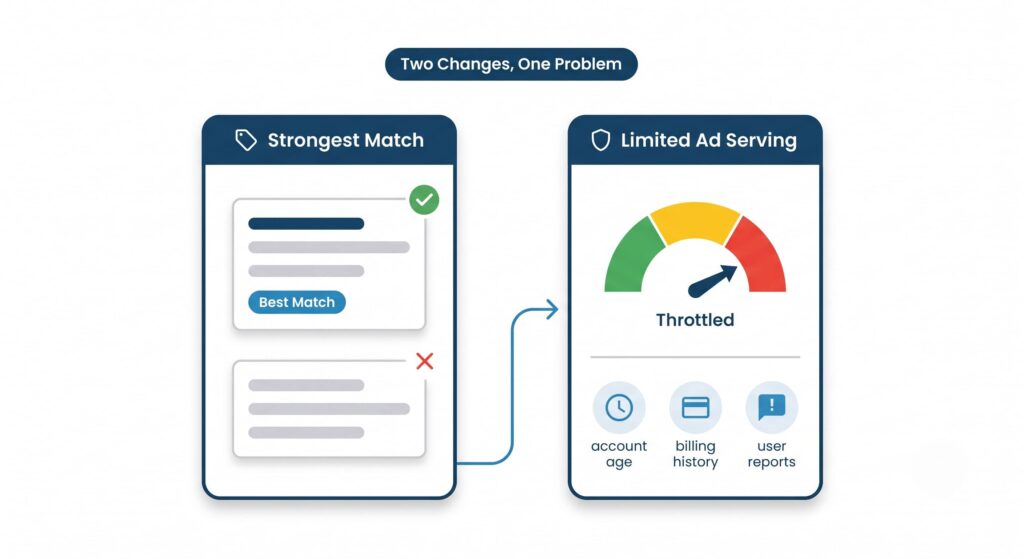
Change 1: “Strongest Match” labels on search ads. Google is testing a label that appears on ads — visible to searchers — that flags which ad is considered the best match for a given query. This sounds harmless. It isn’t. The label signals that Google is making more explicit quality judgments at the ad level, and ads without strong relevance signals are getting deprioritized in the auction before they even compete on bid. If your ad copy, landing page, and keyword targeting aren’t tightly aligned, you’re not just losing the auction — you may not be showing up at all for certain queries.
Change 2: Limited Ad Serving based on advertiser qualification signals. This is the bigger one. Google is expanding a policy called Limited Ad Serving, which restricts how often your ads show based on signals about your account’s trustworthiness. Those signals include things like account age, billing history, policy compliance record, and — critically — user feedback. If people are clicking your ads and then reporting a bad experience, Google can throttle your impressions without telling you exactly why.
What "qualification signals" actually means for a contractor
Google doesn’t publish a clean checklist. But based on what’s been documented, the signals that matter for a home-service account in cities like Downey, Bell Gardens, or Maywood include:
Account history. A brand-new account — or one that had a billing issue, a suspended ad, or a policy strike in the past — starts with less trust. Google is essentially asking: has this advertiser behaved before?
Landing page quality. If someone clicks your ad and lands on a page that’s slow, has no real business information, or looks like a lead-gen middleman page, that’s a negative signal. Google can see bounce behavior.
User reports. This is the one that surprises people. If users click your ad and then report the experience — through Google’s feedback mechanisms — that feeds directly into your qualification score. A handful of complaints can quietly throttle your impressions.
Verification status. Google has been pushing advertisers to complete identity and business verification. Accounts that haven’t done this are more likely to hit Limited Ad Serving restrictions.
The practical result: your ads might be technically approved and actively running, but only showing to a fraction of the searches you’re paying to reach.
The Bell Gardens market context — and why this matters more than you think
Here’s where the paid and organic stories intersect in a way most people miss.
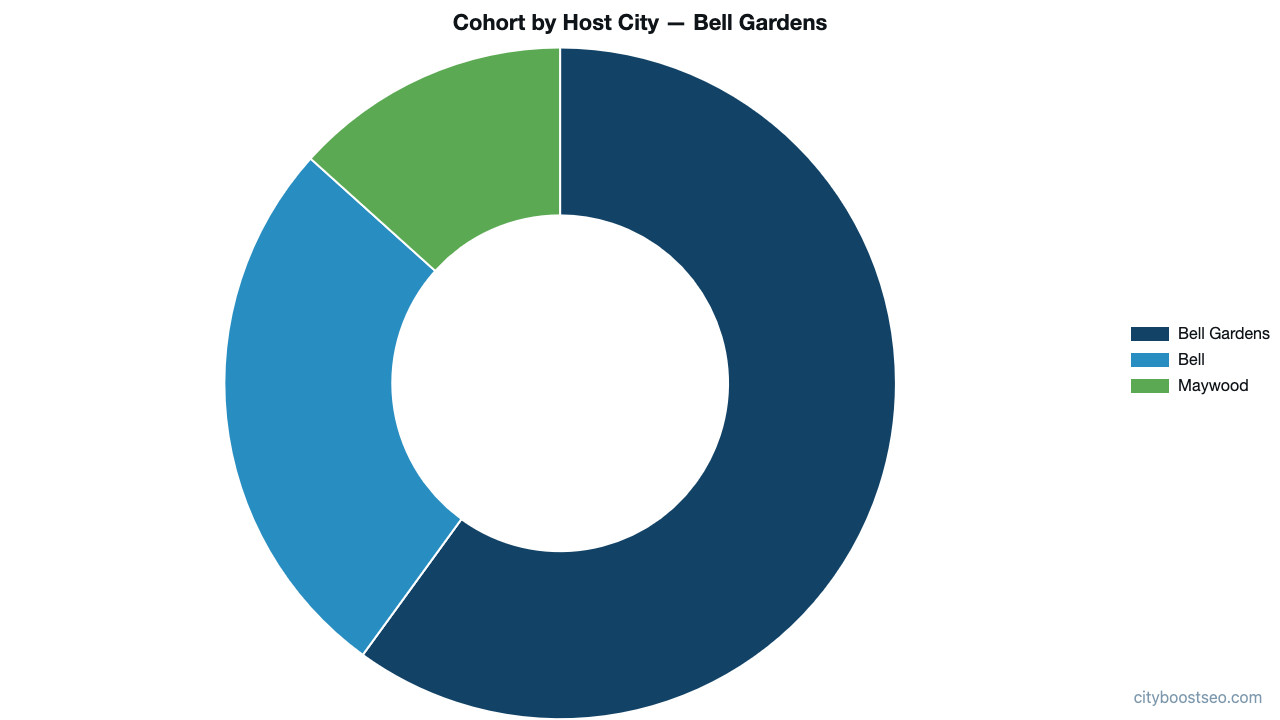
We ran a search for general contractors in Bell Gardens and looked at the 18 profiles competing for that query. Only 9 of those 18 businesses are actually based in Bell Gardens. The rest are serving from Bell (4 profiles) and Maywood (2 profiles), with a cohort density of 0.23 profiles per square kilometer within 5km of Bell Gardens. For comparison, a low-density suburban market typically runs below 0.10 — this cohort is more than twice as crowded, meaning every impression you lose to throttling is immediately captured by a competitor.
That’s a tight, competitive cluster. In a market like this, the businesses running Google Ads are competing against each other AND against the organic and Maps results simultaneously. If your ads get throttled, you don’t just lose paid clicks — you lose the combined presence that makes a searcher trust you enough to call.
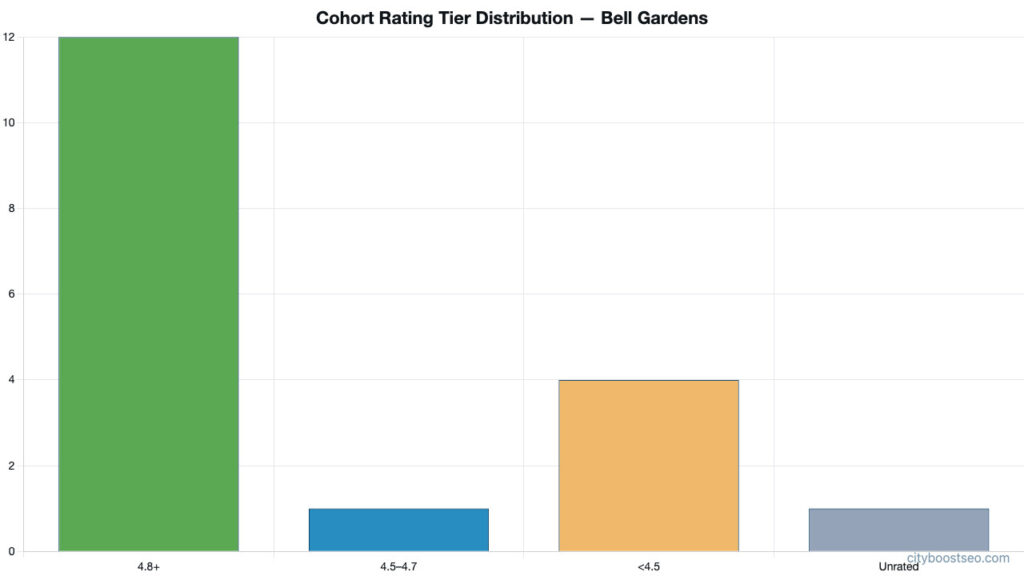
Look at the review picture in this same cohort: 12 of the 18 profiles have a 4.8-star rating or higher. One sits in the 4.5–4.7 range. Four are below 4.5, and one has no rating at all. When a searcher sees your ad, clicks through, and then looks you up on Google Business Profile — if your profile has 3 reviews and a 3.9 rating, that’s a user experience signal that eventually feeds back into your ad account’s qualification score. The paid and organic signals are not separate systems.
What Profile A and Profile B tell us
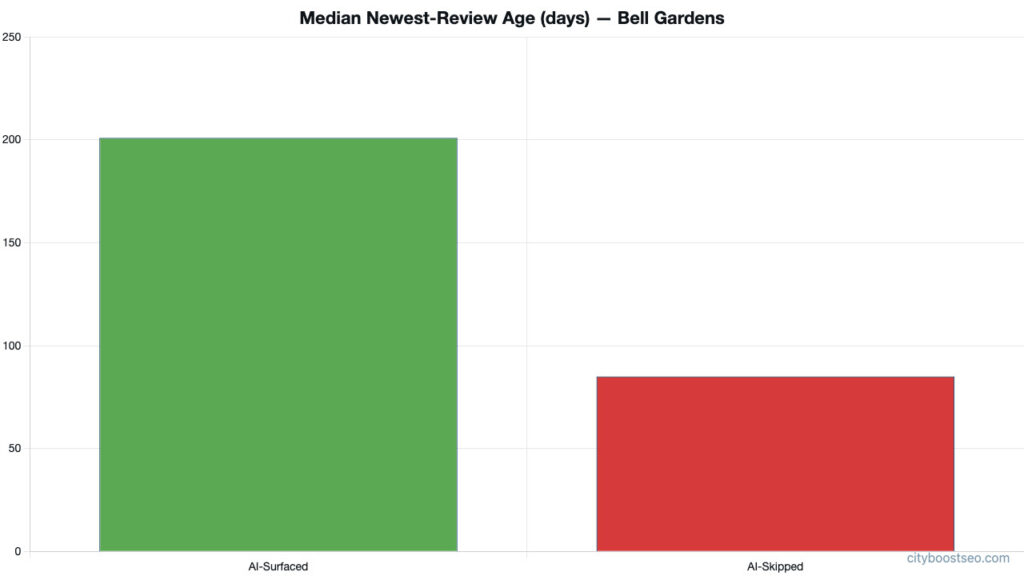
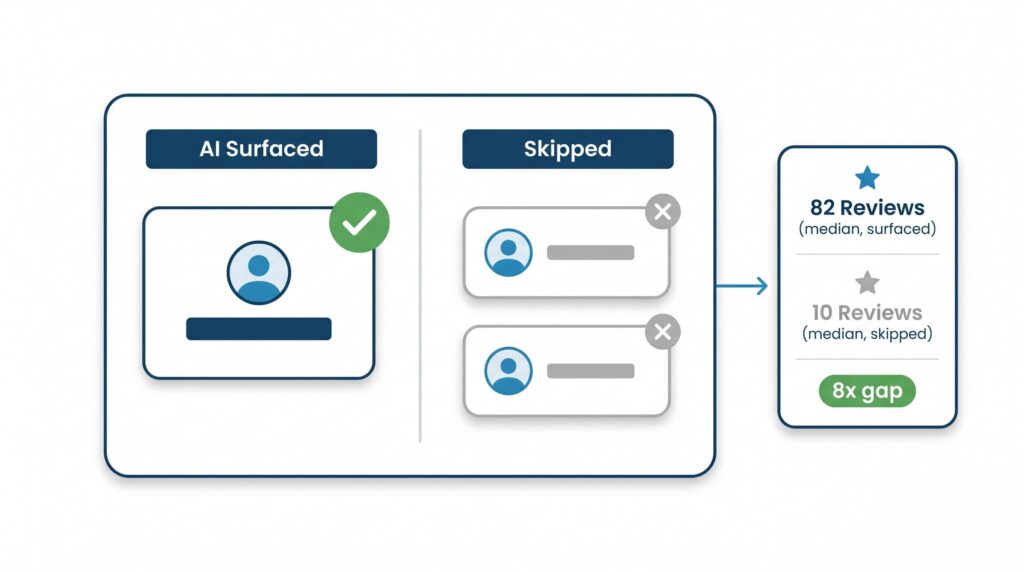
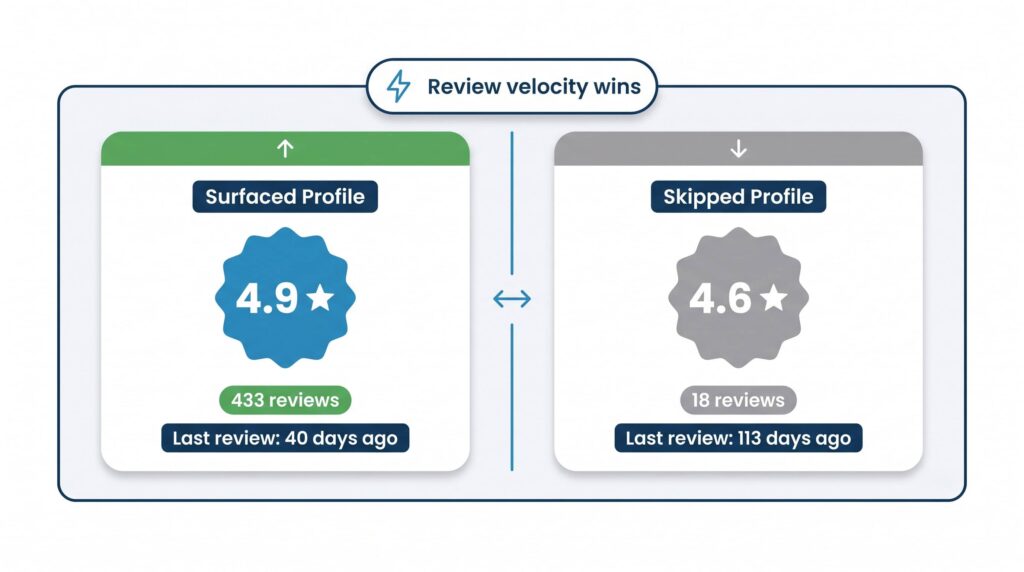
When we asked Google’s Maps-grounded AI for a general contractor in Bell Gardens, it surfaced 5 profiles out of the 18 in the cohort. Profile A — a Bell Gardens-based business with 36 reviews, hours set, and a newest review 201 days old — was surfaced. Profile B — also Bell Gardens-based, with 1 review and a newest review 93 days ago — was skipped entirely.
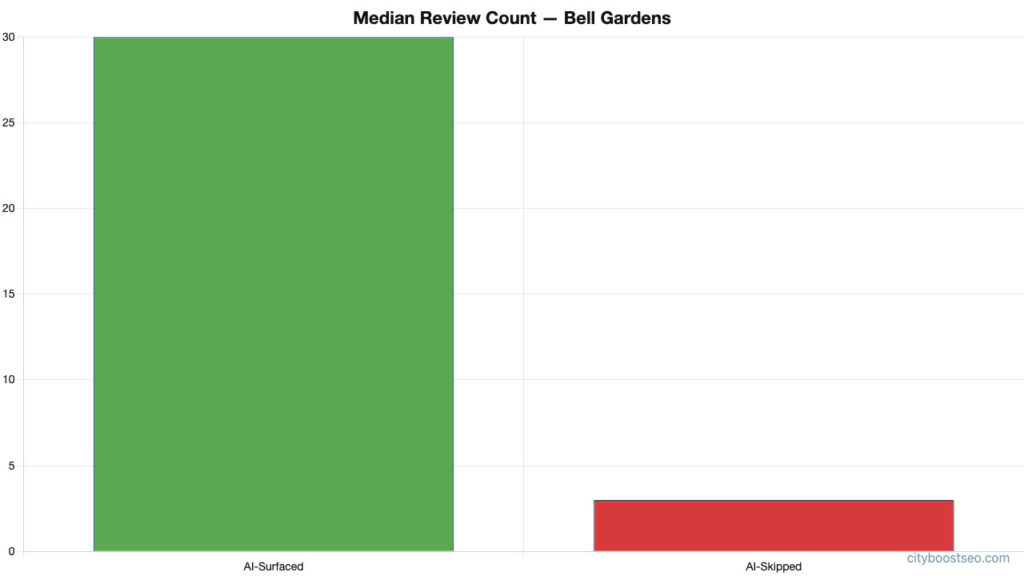
The median review count for surfaced profiles in this cohort was 30. For skipped profiles, it was 3.
That gap matters for your ad account. A business with 1 review and a thin Google Business Profile running Google Ads is sending mixed signals to Google’s systems. The ad says “trust me.” The profile says “I just showed up.” Those signals conflict, and Google’s qualification logic penalizes the conflict.
The "Limited Ad Serving" flag: what it looks like and what to do
If your account has been flagged, you’ll typically see a yellow warning in the Google Ads dashboard — often in the Campaigns or Ad Groups view — noting that your ads are being served at a reduced rate. It won’t always tell you exactly why. That ambiguity is intentional and frustrating.
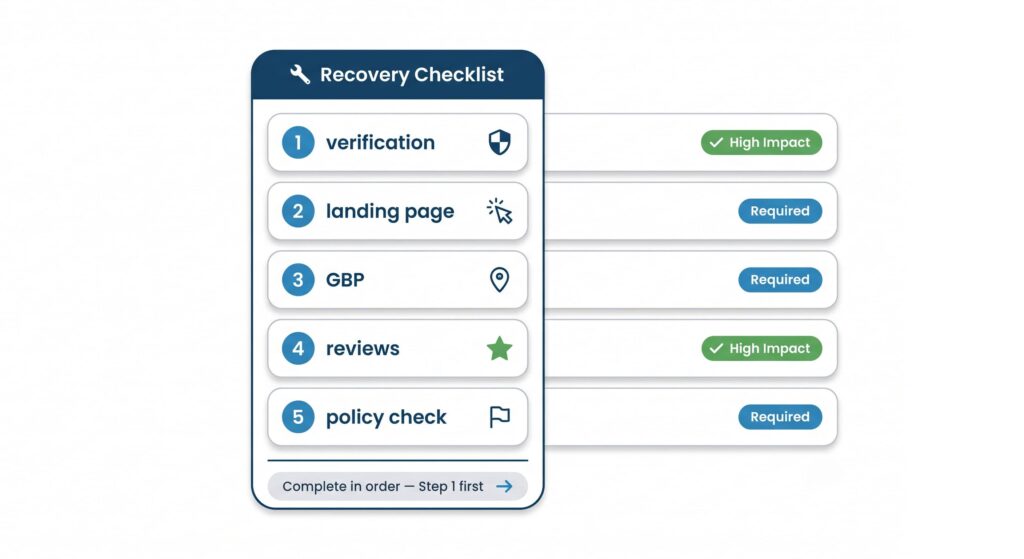
Here’s the recovery sequence that actually works:
1. Complete business verification first. Go to your Google Ads account settings and look for the business verification prompt. If it’s there and incomplete, finish it before anything else. This is the single fastest signal you can send that you’re a real, operating business.
2. Audit your landing page against your ad copy. Every ad group should point to a page that directly matches the promise in the ad. If your ad says “emergency plumbing in Downey” and it lands on your homepage, that’s a mismatch. Build or fix the landing page so the headline, the phone number, the service area, and the call-to-action are all visible above the fold.
3. Clean up your Google Business Profile. Set your hours. Add your service area. Make sure your business name, address, and phone number match exactly what’s in your Google Ads account. Inconsistencies across these systems are a red flag to Google’s trust scoring
4. Get more reviews — and recent ones. Profile B in our Bell Gardens cohort had 1 review. That’s not a Google Ads problem; that’s a trust problem that shows up everywhere, including in how Google treats your ad account. A contractor with 30+ reviews and a 4.8 rating is sending a consistent signal across paid and organic. One with 3 reviews is not.
5. Check for any prior policy flags. Go to Policy Manager in your Google Ads account. If there are any past violations — even ones that were resolved — those stay in your history. You can request reviews for resolved violations to clean the record.
The deeper problem: paid ads on a weak foundation
Google Ads can drive real jobs for a general contractor in Bell Gardens, Downey, or Maywood. But it works best when the foundation underneath it is solid. That means a complete, active Google Business Profile. That means recent reviews. That means a landing page that looks like a real business and loads in under 3 seconds.
When contractors come to us after a Limited Ad Serving flag, the paid account is almost never the only problem. The profile has stale reviews. The landing page has a phone number that doesn’t match the GBP. The business verification in Google Ads was never completed. The ad is sending traffic to a page that wasn’t built for conversion.
These aren’t separate problems. They’re the same problem: Google doesn’t have enough consistent, trustworthy signals to treat your account like an established, legitimate advertiser.
Buying leads from Angi or Thumbtack doesn’t fix this. It rents you customers on someone else’s platform while your own account loses ground. The path forward is building the signals Google actually uses — and then running ads on top of that foundation, not instead of it.
What to do Monday morning
Pull up your Google Ads account. Go to Tools → Business Verification and check whether verification is complete. If it isn’t, start there — it’s a 15-minute task and it’s the single fastest way to send a positive qualification signal. Then go to your Google Business Profile and confirm your hours are set, your phone number matches your ads, and your most recent review isn’t from 2023.
That’s it. Two things. Do those before anything else.
How City Boost helps
We manage Google Ads for home-service businesses across the SGV and Southeast LA — and we audit the full picture: the ad account, the landing pages, the Google Business Profile, and the review signals, because all of it feeds into whether your ads actually show. If you’ve seen a Limited Ad Serving flag or your impressions have quietly dropped, we can tell you exactly why. Talk to us about Google Ads management.
Sources

Keep Reading
All Posts →

See where you rank today.
Get a free audit and we'll show you exactly where your business stands in the local map pack — and how to climb.